Security & Threat Model
Last updated: September 12, 2026
Every claim below is sourced from Daisy's code — you can read it yourself at github.com/smallbricktory/daisy-local.
Daisy is a local-first meeting recorder, transcriber, and summarizer. On desktop, the security posture follows from that: your recordings, transcripts, and summaries live on your disk, in open formats, and leave your machine only through paths you explicitly configure. Credentials are encrypted at rest. The app is fully functional offline. On iPhone and iPad, meeting content is stored encrypted.
1. Architecture and trust boundaries
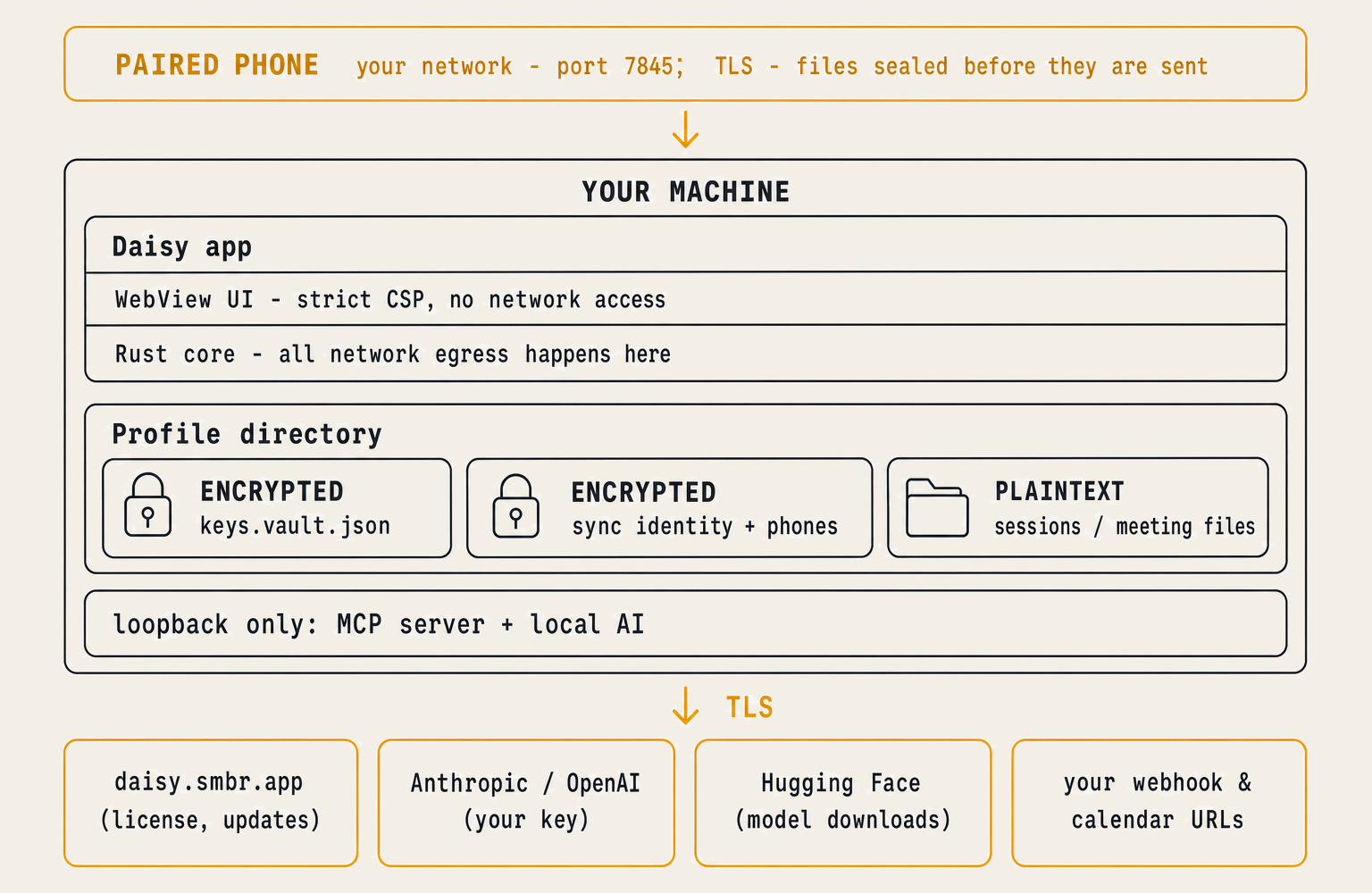
Trust boundaries:
- WebView ↔ Rust core. The UI cannot reach the network or the filesystem
directly; every operation goes through Tauri commands. CSP:
connect-src ipc: http://ipc.localhostonly — even injected script in the WebView has no network path (tauri.conf.json). - App ↔ disk. Secrets cross this boundary only inside the encrypted vault envelope. Meeting content crosses it in plaintext by design (§3).
- Machine ↔ network. Nothing containing meeting content crosses this boundary unless you configure a cloud provider or a webhook integration (§4).
- This computer ↔ a paired phone. A phone reaches this computer over your own network, on a listener that exists only after you paired it. Every request carries the phone's TLS certificate, its device id and its signature, and all three have to name the same paired phone (§4).
2. Data classification
| Class | Examples | At rest | Rationale |
|---|---|---|---|
| Credentials | Provider API keys, webhook auth secrets, calendar feed URLs, per-install signing seed, MCP token, voiceprint embeddings, the Mobile Sync identity keys | Encrypted (vault) | Dangerous in motion; encryption must travel with the file (backups, sync) |
| Meeting content | Audio, transcripts, summaries, chapters, in-call chat, search index | Plaintext, open formats | Your data; grep-able, sync-able, outlives the app. Protect with full-disk encryption (§7) |
| Configuration | Settings, tags, prompts, workflows, contacts | Plaintext | Needed before vault unlock; contains no secrets |
| License / install identity | Install ID, license key, signed validity stamp | Plaintext | Needed before vault unlock; low-value, seat-limited, server-revocable |
3. Data at rest
All paths are relative to the profile directory (your platform's data dir).
Encrypted — the vault. keys.vault.json holds provider API keys, integration
webhook auth values, subscribed calendar feed URLs, the per-install signing seed,
the MCP bearer token, and voiceprint embeddings. calendar/events.json is an
encrypted cache derived from those feed URLs.
Encrypted — the Mobile Sync identity. sync.<machine>.vault.json holds this
computer's Ed25519 signing key, the X25519 key phones seal files to, the TLS key
and certificate, the device id, and the phones you paired. It is sealed under the
same passphrase, re-sealed when the passphrase changes, and removed by a vault
reset. The name carries the machine, so a profile shared between two computers
carries two identities and two pairing tables.
The vault uses AES-256-GCM with a key derived by Argon2id (64 MiB, 3 iterations, 4 lanes), a fresh random salt and nonce on every write. A wrong passphrase is an authentication failure, never garbage output.
- Passphrase mode (recommended): minimum 22 characters and a "strong" strength score, enforced at creation. There is no recovery — a lost passphrase means re-entering your keys and re-enrolling voiceprints. Recordings stay.
- Machine mode (opt-in): the key derives from the OS machine ID and the vault auto-unlocks at startup. This protects vault copies that leave the machine (backups, synced folders) but not against someone with access to the running machine. Choose passphrase mode if your threat model includes other local users.
Plaintext — meeting content lives under sessions/<id>/: audio, transcript,
summary, chapters, in-call chat, and the local semantic-search index. This is your
data in open formats — see Vault & profile.
Plaintext — configuration (settings, tags, prompts, workflows, contacts,
integration history) contains no secrets; it's needed before the vault unlocks.
sync.<machine>.nonces.json belongs here too: it records the request nonces each
paired phone has spent, which is what makes a captured request useless a second
time.
Files arriving from a phone stage in sync.<machine>.inbox/ as the phone
wrote them — sealed envelopes, opened with this computer's X25519 key — and land
in sessions/<id>/ on import, where they are plaintext like everything else in
your library.
Logs are local only, rotated daily, deleted after 7 days. Process names in performance log lines are salted-hashed. Detailed logs set to Full also record transcribed text.
Telemetry: none. No analytics, crash reporters, or tracking calls exist anywhere in the app.
4. What leaves your machine, and when
Offline, Daisy records, transcribes (an on-device speech model — bundled, downloaded, or your operating system's own), summarizes (with a model you run in LM Studio or Ollama, or its own built-in model), suggests tags (a text matcher that runs here), searches, and takes recordings from a paired phone, all with zero egress. This is the complete inventory.
Automatic — never any meeting content
| Call | Destination | Carries | Gate |
|---|---|---|---|
| Update check | daisy.smbr.app/updates/… |
A version string | On launch + every 6 h, only if the auto-update-check setting is on; notify-only (the app never downloads or installs updates itself); fail-silent |
| License check-in | daisy.smbr.app/api/license/refresh |
License key | On launch + a 6 h beat; the app attempts it at most once a day; fail-silent |
| Calendar refresh | Your ICS/webcal URLs | The fetch itself | Only if you subscribed a calendar |
User-configured or user-clicked — content only by your choice
| Feature | Destination | Carries |
|---|---|---|
| AI features (summaries, chapters, chat, analysis, polish, Q&A) | The provider you pick: Daisy's built-in model (nothing leaves this machine), Groq, OpenAI, Anthropic, or your own LM Studio / Ollama server | Transcript text + your prompts (your key); Q&A sends only the matching excerpts |
| License activate / deactivate | daisy.smbr.app/api/activate, /api/deactivate |
License key, install ID, plus a per-install public key (activate) or the activation receipt (deactivate) |
| Webhook integrations | Your URL (Zapier / n8n / your endpoint) | The payloads you select per destination — see Integrations |
| Speech-model download | huggingface.co (Whisper), github.com releases (Parakeet), Apple's own servers via macOS (Apple Speech) |
Nothing personal (you click download); every file Daisy fetches is SHA-256-verified against a pin in the binary |
| Help / source links | www.daisylocal.app, the source repo |
Nothing — opens in your browser |
Daisy Cloud — the daisy.smbr.app/api/gateway/… endpoint in the code is an
internal-only service tied to the license key. When a license is entitled,
Daisy proxies the AI step (transcript text, never audio) to Anthropic and
OpenAI using our own keys — Ed25519-signed per install, with no stealable API
key. It's an internal convenience, not part of a normal install;
regular users run the built-in model, a local model, or their own key.
Every call Daisy makes to its own servers, to model downloads, and to cloud AI
providers uses TLS. A calendar feed or AI server address you enter as http://
travels unencrypted; use https:// addresses for anything off this machine. The UI performs zero direct HTTP — every
call above happens in the Rust core behind an explicit command, and the CSP gives
injected WebView script no network path.
Mobile Sync — your own network, and no further
A phone running Daisy pairs with one computer and sends its recordings there. That traffic goes from the phone to this computer across your own network; no server of ours is involved, and nothing about it reaches the internet. What travels, and which way, is in Syncing recordings from your phone.
Pairing. Settings → Mobile Sync → Show pairing code opens a 90-second window and shows a QR carrying this computer's device id, its signing public key, the fingerprint of the certificate the phone will pin, a single-use 32-byte secret, and the name and port to reach. The phone answers with its own identity under a MAC keyed by that secret; the first valid answer closes the window, so one code pairs one phone. Unpairing forgets the phone and the nonces it spent.
Every request after that. Three things have to name the same paired phone: the certificate presented in the TLS handshake, the device id in the header, and an Ed25519 signature over the method, path, device id, nonce and body hash. A nonce is accepted once. Uploads are checked against the hash they claim, capped at 256 MiB, and written only under a checked session id and relative path.
The files themselves. A phone seals each file as an AES-256-GCM envelope whose data key is wrapped to this computer's X25519 public key, and sends those bytes as they sit on its disk — so the phone can upload while it is locked, and what crosses the network is ciphertext inside TLS.
Local listeners — inbound, and never from the internet
| What | Where | Gate |
|---|---|---|
| Mobile Sync | Port 7845, TLS with this computer's own certificate | Runs only while the vault is open and a phone is paired or a pairing code is on screen. Pairing is the one route that answers without a client certificate, and only inside the 90-second window |
| MCP server (lets tools like Claude Desktop query your meetings) | 127.0.0.1:<port> |
Off by default; a 256-bit bearer token held in the vault, compared timing-safe; write tools need a second, separate opt-in |
| Bluetooth LE wake, macOS | One service per pairing | The service UUID is derived from that pairing and is all the advertisement carries — no device name, no manufacturer data. The address a woken phone reads is encrypted under the pairing's own key |
5. Threat model
Assumptions. Your OS and user account are not compromised (Daisy is an app, not an anti-malware boundary — software running as you can read what you can read). TLS/PKI works.
| Threat | Scenario | Mitigation |
|---|---|---|
| Information disclosure | Profile folder leaves the machine (cloud backup, Syncthing, sold laptop, support zip) | Credentials stay AES-256-GCM ciphertext wherever the files travel; meeting content is plaintext by design — see §6 |
| Information disclosure | Another local user reads the vault file | Passphrase mode: Argon2id makes offline guessing expensive; a strength policy blocks weak passphrases |
| Information disclosure | Data leaks into diagnostics | No telemetry; logs carry no transcript text unless Detailed logs is set to Full, which also records transcribed text; process names hashed |
| Information disclosure | Someone reads a pairing code over your shoulder or off a screen share | The code lasts 90 seconds, carries a single-use secret, and closes on the first phone that answers |
| Information disclosure | Recordings are read off the network in flight | Files cross as AES-256-GCM envelopes wrapped to this computer's X25519 key, inside TLS |
| Information disclosure | A Bluetooth listener tracks the machine | The advertisement carries one pairing-derived service UUID and nothing else; the address inside is encrypted under that pairing's key |
| Spoofing | Stolen "API key" for the gateway | No bearer credential exists — a per-install Ed25519 signature over method, path, timestamp, nonce, and body hash; replay-limited |
| Spoofing | A device on your network poses as your paired phone | Certificate, device id and Ed25519 signature all have to name the same paired phone; the pairing table lives in the encrypted identity file |
| Spoofing | A captured phone request is sent again | Nonces are recorded per device and refused the second time |
| Tampering | Malicious "update" | Updater is notify-only; you download from the website in your browser. Windows builds are Authenticode-signed, macOS builds Developer ID-signed (both to Apexis Solutions Inc.) |
| Tampering | License forgery | Validity stamps are Ed25519-signed by the vendor, verified against a key pinned in the binary |
| Tampering | A paired phone uploads a file that is not what it claims, or aims at another session | The hash is verified, the body capped at 256 MiB, and the path checked against the session id it names |
| Elevation of privilege | Web content escapes the UI | Strict CSP (no network, frames, or objects); zero direct HTTP from the frontend; all privileged ops are explicit commands |
| Elevation of privilege | A local process abuses the MCP port | Loopback bind + vault-held bearer token; off by default; write access separately gated |
Explicitly out of scope: a compromised OS or root-level malware / memory scraping of the running, unlocked app (no desktop app can defend this); machine- mode vault against a local attacker (a documented tradeoff); a configured cloud provider's own data handling (their retention applies to what you send them — the local default sends nothing); physical theft of a powered-on, logged-in machine; a paired phone in someone else's hands, unlocked — it holds its own pairing, and the remedy is to unpair it here.
6. Residual risks
- Meeting content is plaintext on disk. Deliberate: encrypting it would let a lost passphrase destroy your entire history, complicate crash recovery, and break grep/sync of your own data — while adding little against the realistic attacker (anything running as you reads it anyway while the app is open). The mitigation is full-disk encryption (§7), which covers the real at-rest threat: a stolen or discarded disk.
- The vault protects copies, not the running machine. An attacker with persistent code execution as you can wait for unlock.
- One model install is out of Daisy's hands. Every speech model Daisy downloads itself is SHA-256-pinned in the binary. Each download is written to its final path, then checked against that pin; a mismatch deletes the file and the install fails. The exception is Apple's on-device speech engine on macOS, whose assets the operating system fetches and verifies under its own rules; Daisy only asks for them.
- Webhooks trust your endpoint. Payloads go to the URL you configure.
- Mobile Sync is visible on your network. While the vault is open and a
phone is paired, port 7845 accepts connections on every interface, and the
computer answers to its
.localname so the phone can find it. What a stranger on that network learns is that the port is there: without the paired phone's certificate, device id and signing key, every route refuses.
7. What you should do
- Turn on full-disk encryption — BitLocker (Windows), FileVault (macOS), LUKS (Linux). This is the intended protection for meeting content at rest.
- Prefer passphrase mode for the vault on shared or managed machines.
- Treat the profile folder like the recordings it contains when backing up or syncing — the vault file is safe anywhere; transcripts are as private as the folder you put them in.
- Point webhooks only at endpoints you control or trust.
- Unpair phones you no longer use, in Settings → Mobile Sync. Show a pairing code with the phone already in your hand; it expires 90 seconds later.
Running Daisy where PHI is involved? See Configuring Daisy for HIPAA and PHI.
8. Reporting a vulnerability
Please report suspected vulnerabilities privately by email to support@daisylocal.app rather than in a public issue. Include steps to reproduce and the build SHA from Settings → About. We aim to acknowledge within 72 hours.